Setting Up Competitor Tracking in Halogen Presence
Competitor tracking in Halogen Presence only tells you something useful if you pick the right competitors. Here's how to choose them and how to read the comparison once it's running.

Adding a competitor to Halogen Presence takes a few seconds. Picking the right one takes more thought, and it's the part that determines whether the resulting data tells you anything.
Track who your buyers actually compare you to, not who you'd like to beat
It's tempting to add the biggest name in your category. Resist that. AI visibility tracking is only useful when the comparison set matches the questions your buyers are actually asking: "best AEO tool," not "biggest company in my industry." A well-funded competitor who never gets cited in AI answers tells you nothing except that they haven't optimized for this yet either.
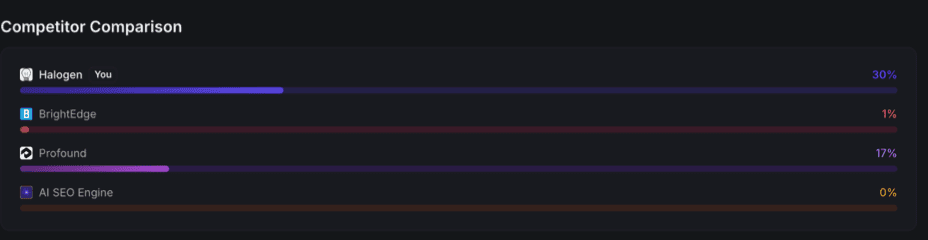
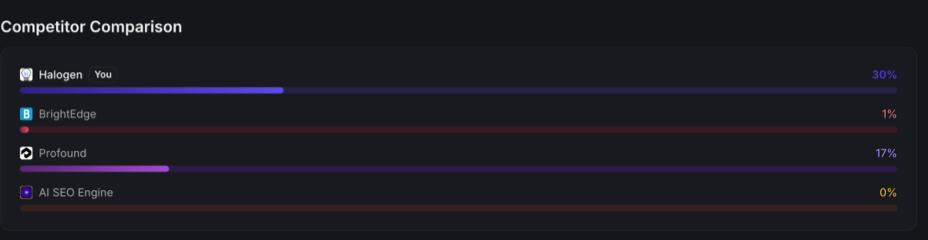
The screenshot above is our own comparison set: Halogen against BrightEdge, Profound, and AI SEO Engine. Those aren't the three biggest SEO platforms on the market. They're the three that show up most often when AI models answer prompts in our category. That's the criterion that matters.
What the comparison actually measures
Each bar is a visibility percentage on the exact same set of tracked prompts. A 30% score next to a competitor's 1% isn't a claim that you've won your category. It's a count: across the specific buyer questions you're both tracked against, AI models named you thirty times as often as they named them. Change the prompt list and the bars can shift, so the comparison is only as meaningful as the prompts behind it.
This is also why a near-zero competitor score isn't necessarily good news. If everyone in your comparison set is under 20%, AI models mostly aren't citing anyone by name yet for these questions. That means the category is still open, not that you've already won it.
Add competitors with distinct positioning, not just the closest ones
Three or four competitors is usually enough to be useful without diluting the picture. Beyond that, differences start to blur together. If you can, pick competitors that differ from you in a way that matters to your buyers: priced differently, targeting a different company size, or positioned around a different feature. That way a gap in the comparison points at something specific you can act on, rather than a vague "they're doing better."
Revisit the list periodically
Your comparison set isn't fixed. As competitors gain or lose ground in AI answers, or as new ones start showing up in the same prompts, it's worth checking every few months whether the businesses you're tracking are still the right ones. A comparison set built a year ago, against last year's competitors, will quietly stop being useful.
Once your competitors are set, the dashboard's trend chart and Competitor Comparison bars update automatically as new checks run. For a full walkthrough of what those numbers mean, see how to read your AI visibility score.